
Overview
This workflow is used for preparing embroidery orders for production. The process depends on whether the design already exists in StitchVault (SV) or if a new embroidery file needs to be created and sent to digitizer.
- Existing Design → Reuse and update files in-house
- New Design → Upload files and send to digitizer.
Always verify:
✅ Embroidery size
✅ Thread colors
✅ Correct links before syncing inventory
Check if Design Already Exists
Search in SV using either the Product SKU, or the church/store name. Sometimes the exact SKU won’t show anything, but searching the church name may pull up a similar existing design.
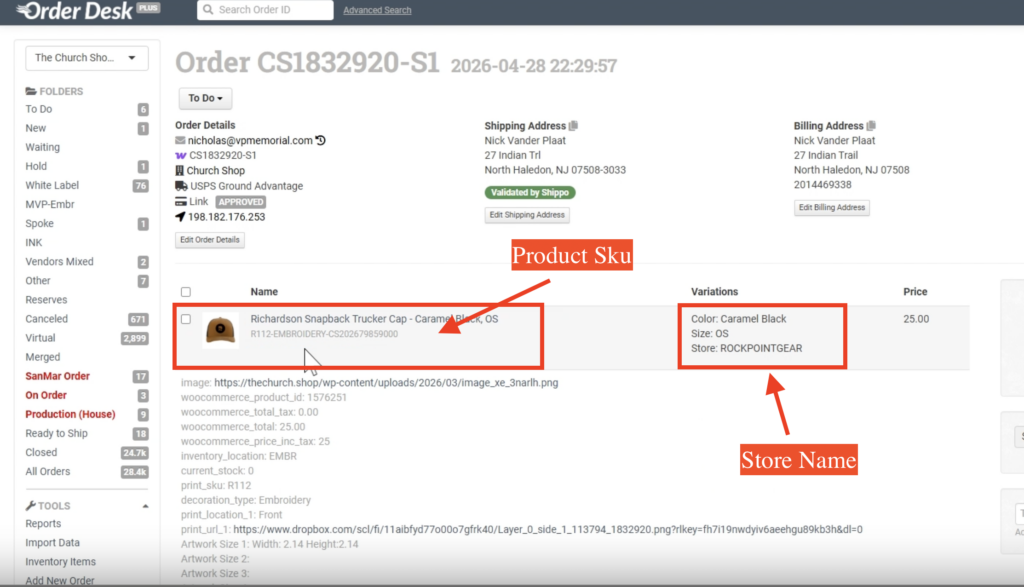
If You Find an Existing Design
Before reusing the file, double-check the embroidery size, thread colors, and whether it will still work for the current item.
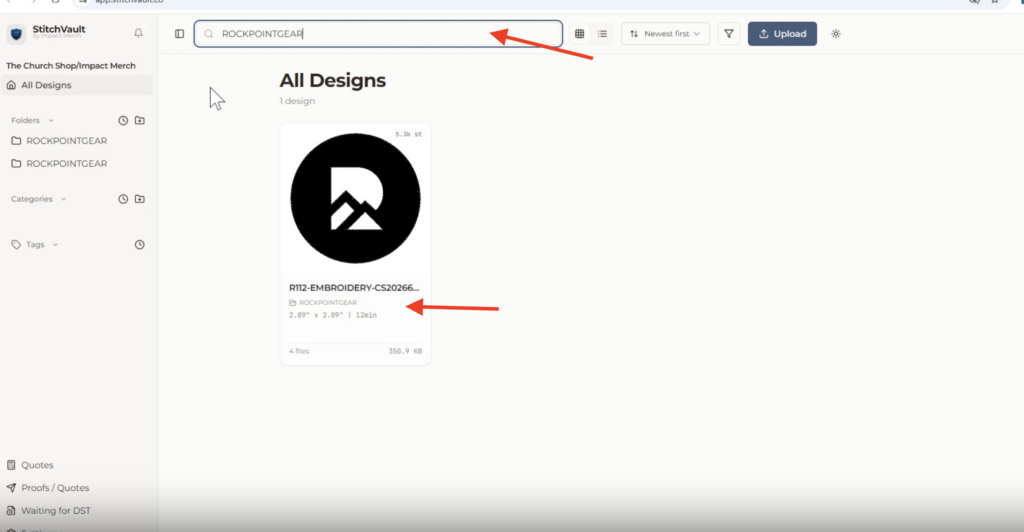
If needed, verify the actual embroidery size in WordPress since SV dimensions aren’t always accurate.
If everything looks good: reuse the existing DST file, create a separate SKU version for the new item, and process it as an in-house embroidery file (no need to send to AJ).