
With the release of the Bypassed Approval feature, we’ve updated the product approval process to streamline reviews while maintaining quality control.
1. Bypassed Items
What they are:
Products (excluding embroidery items) that churches can publish directly without going through the standard approval workflow.
Who can use it:
All churches, across all membership plans.
Important:
Churches will see a warning message on their settings page before enabling this feature.
The notice highlights potential issues that may occur when publishing items without review.
2. Review Frequency
- Bypassed items are less urgent to review compared to standard product approvals.
- These can be checked once per day.
- All bypassed items are tracked in the Approval Sheet under the “Bypassed” tab.
- They are still counted toward the daily tally.
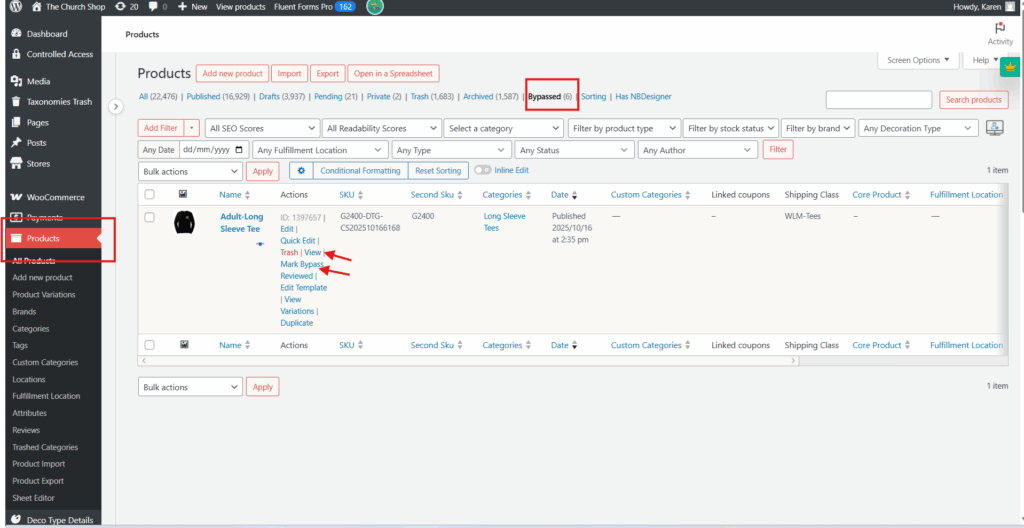
3. How to Review Bypassed Items
Bypassed items do not appear in WCFM.
To review:
- Go to WP Admin → Products → Bypassed tab.
- For each item:
- Click Review.
- Perform the regular product checks.
- Once complete, click Mark Bypass.
4. Responsibilities
| Team Member | Responsibility |
|---|---|
| @ProdTeam | Embroidery items (regular approvals only) |
| @Support Team | Non-embroidery regular approvals and bypassed items |
Notes:
- Continue to apply the same quality standards during bypassed item checks.
- Report any repeated issues or inconsistencies to the QA or product management team.