
This process explains how to handle withdrawal requests in WCFM, including payments made through Stripe, PayPal, Bank Transfer (Melio), and Check Requests. The Withdrawals section in WCFM displays all pending withdrawal requests and their corresponding amounts.
Stripe and PayPal Withdrawals
Stripe and PayPal withdrawals are processed directly through WCFM.
Go to the Withdrawals tab, locate the vendor’s request, click the box icon on the left side, and then select Approve at the bottom of the page.
Both payment methods have the same processing timeframe.
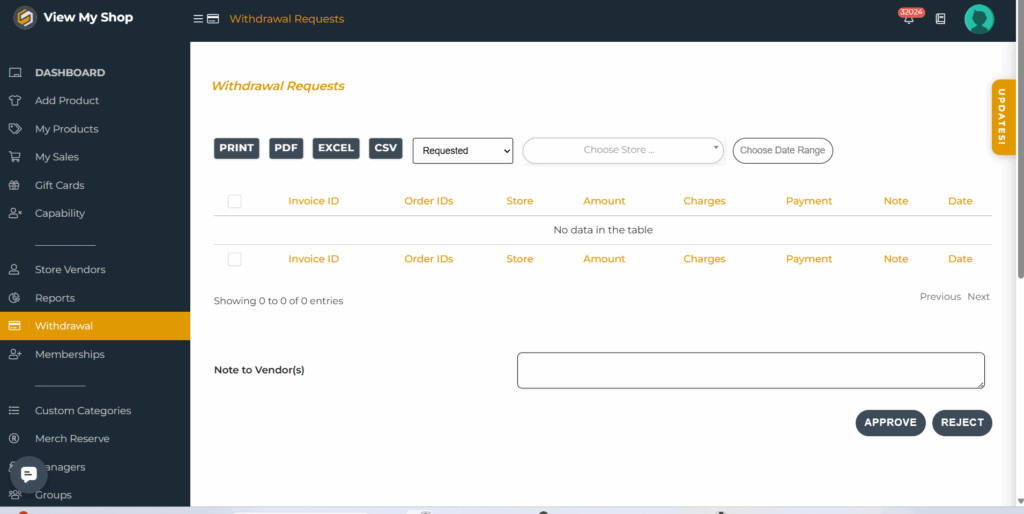
If a withdrawal must be rejected, scroll to the comment section at the bottom, add the reason (for example, the vendor’s Stripe or PayPal account was not linked), and then reject the request.
Bank Transfer Withdrawals (via Melio)
For bank transfers, payments are made through Melio.
Open Melio and click New Payment on the upper right corner. Search for the vendor or church name (e.g., “Morning Star Church”).
If nothing appears, it means this is their first withdrawal click Add New Vendor, enter the church’s information, and click Save.
Set the payment as One-Time Payment, enter the withdrawal amount, and click Continue to Pay. Ensure an invoice number is included and double-check all details before confirming.
Once the payment has been processed in Melio, return to WCFM → Withdrawals, add a note to the vendor with the ETA of the payment, and then click Approve.
Check Requests
Check requests are also processed through Melio using the same steps as bank transfers. When setting up the payment, select Check Request instead of bank transfer. Note that there is a per-check fee charged by Melio.
After confirming the payment, Melio will display the expected check delivery date. Record this ETA in the WCFM Withdrawals notes before approving the request.
Summary
Stripe and PayPal payments are processed and approved within WCFM.
Bank Transfers and Check Requests are handled in Melio but still require approval and ETA notes in WCFM.
Always verify all details, invoice entries, and ETAs before approving any withdrawal request.
Quick Reference
- Stripe / PayPal: Process directly in WCFM → Approve → Add notes if rejected.
- Bank Transfer (Melio): Pay via Melio → Add ETA in WCFM → Approve.
- Check Request (Melio): Same as bank transfer → Note ETA and fee → Approve.
📹 Refer to the video below for a full walkthrough.